Peb txhua tus yuav muaj cov kev paub zoo li no: thaum peb saib video nrog tws Bluetooth earbuds, peb yuav paub tias muaj qee yam tsis raug. Peb yuav pom tias muaj qhov tsis sib xws me ntsis ntawm lub qhov ncauj ntawm tus neeg hais lus daim di ncauj thiab lub suab hnov los ntawm Tuam Tshoj Bluetooth earbuds - muaj kev ncua!Qhov kev ncua sij hawm uas tau ntsib thaum lub sijhawm no hu ua Bluetooth audio delay.
Txawm hais tias nws tsis yog ib yam tshiab uas Bluetooth latency ua rau qeeb thiab lags, nws tau muaj txij li thaum pib ntawm kev txhim kho thev naus laus zis. Tshwj xeeb tshaj yog thaum ua si online,Lub suab Bluetoothkev ncua sij hawm tej zaum yuav loj heev. Yog li ntawd, tsab xov xwm no yuav piav qhia txog cov hauv paus ntawm Bluetooth latency, tej yam uas yuav cuam tshuam rau, yuav ua li cas kom txo tau Bluetooth latency thiab vim li cas nws thiaj li yuav tsis ploj mus tag.
Dab tsi ua rau Bluetooth Lag?
Yuav kom nkag siab txog qhov qeeb ntawm lub mloog pob ntseg Bluetooth, koj yuav tsum xub nkag siab txog qhov qeeb. Hauv kev suav lej, latency txhais tau tias lub sijhawm uas cov ntaub ntawv siv los hla ntawm ib qho chaw ntawm lub network mus rau lwm qhov. Latency yog lub sijhawm uas cov ntaub ntawv suab yuav tsum xa los ntawm nws qhov chaw (Smartphone, TV, game console, lossis PC) mus rau nws qhov chaw (headset lossis speaker).Txawm hais tias muaj kev vam meej ntau hauv daim teb no, qhov kev ncua sijhawm tsawg kawg nkaus uas tau ua tiav los ntawm cov khoom siv niaj hnub noBluetooth V 5.0 lub mloog pob ntsegthiab cov mloog pob ntseg tseem yog li 34 milliseconds (aptx qis qeeb). Txawm hais tias qhov kev ncua no suab me dua, nws siab dua li qhov kev ncua hauv cov mloog pob ntseg wired (feem ntau ntawm 5-10 milliseconds).
Nrog cov xov hlau, nws yooj yim heev. Muaj ib txoj kab ncaj qha rau kev sib txuas lus ntawm koj lub khoos phis tawj lossis xov tooj thiab lub cuab yeej sab nraud, uas tso cai rau lawv sib pauv cov ntaub ntawv. Thaum koj tshem cov xov hlau, tej yam yuav dhau los ua qhov tsis meej rau lub teeb liab.
Lub mloog pob ntseg Bluetooth txheem, xws li peb cov khoom WEB-AP28, muaj qhov qeeb qis ua piv txwv.
Vim tias cov ntaub ntawv qub tsis tuaj yeem xa tau wirelessly, cov ntaub ntawv suab yuav raug hloov mus rau hom ntawv uas sib xws nrog Bluetooth kis. Feem ntau nws raug nias, yog li kev xa cov ntaub ntawv siv sijhawm tsawg dua (qhov me dua ntawm cov ntaub ntawv, qhov ceev dua kev xa cov ntaub ntawv); Tom qab ntawd cov ntaub ntawv raug xa mus rau lub mloog pob ntseg Bluetooth, uas yuav tsum tau hloov mus rau hauv lub teeb liab analog ua ntej nws tuaj yeem ua si. Tag nrho cov no siv sijhawm. Txawm tias peb tab tom tham txog milliseconds, cov kauj ruam ntxiv no yuav ncua cov txheej txheem, yog li ua rau muaj kev ncua sijhawm ntau dua thaum siv lub mloog pob ntseg Bluetooth.
Muaj ob peb txoj hauv kev uas koj tuaj yeem txo qhov latency ntawm Bluetooth.
1. Nyob Hauv Qhov Chaw Uas Muaj Bluetooth Device
Vim tias paub tias qhov deb ntawm lub cuab yeej pib thiab lub cuab yeej txais yuav cuam tshuam rau kev ua haujlwm ntawm Bluetooth. Kauj ruam thawj zaug hauv kev txo qhov latency ntawm Bluetooth yuav tsum yog xyuas kom meej tias ob lub cuab yeej nyob ze rau ib leeg thiab tsis muaj kev thaiv lub cev ntau dhau ntawm lawv.
Piv txwv li, Bluetooth 4.0 muaj ntau yam tshaj 300 feet hauv qhov chaw qhib thiab sab nraum zoov. Tab sis qhov tseeb versionBluetooth 5.0, muaj ntau dua ob npaug ntawm qhov ntau nrog 800 ko taw hauv qhov chaw qhib ib nrab thiab txog li 1000 ko taw hauv qhov chaw qhib. Ntawm no koj yuav paub txog peb cov tws earbuds WEB-AP19 uas los nrog Bluetooth version tshiab.
2. Tshem tawm thiab rov txuas cov khoom siv Bluetooth
Qee zaum qhov ua rau Bluetooth qeeb yog qhov yuam kev sib txuas. lub cuab yeej tsis tau txuas zoo thaum sib txuas. Ntau lub cuab yeej Bluetooth kuj muaj kev qeeb thaum lawv txuas ntev. Hauv qhov no, tsuas yog txiav thiab rov txuas lub cuab yeej Bluetooth kom daws qhov teeb meem. Yog tias kev txiav thiab rov txuas dua tsis pab daws qhov Bluetooth Latency, koj tuaj yeem sim tshem tawm kev sib txuas lub cuab yeej thiab tom qab ntawd kho nws.
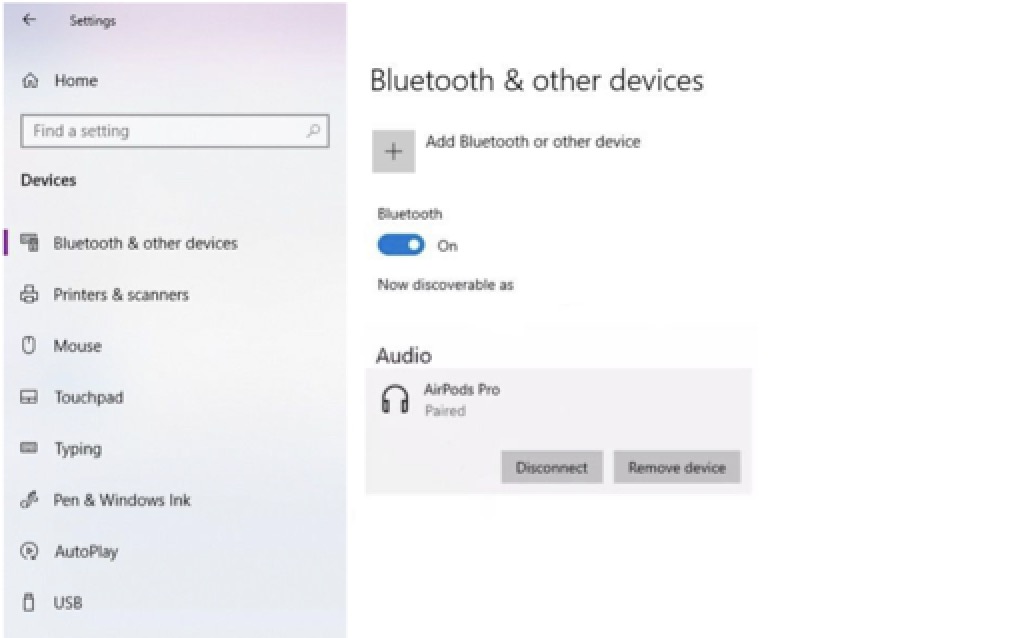
Piv txwv li, ntawm Windows 10, koj tuaj yeem nyem rau ntawmPib > Chaw > Cov Khoom Siv > Bluetooth, ces tig qhov kev xaiv Bluetooth tawm thiab tos ob peb feeb ua ntej tig nws rov qab.
3. Siv cov codecs sib txawv
Raws li tau hais los saum toj no, nws yog ib qho tseem ceeb kom phim lub codec ntawm lub cuab yeej qhov chaw thiab lub cuab yeej Bluetooth. Txwv tsis pub, qhov chaw teeb tsa yuav rov qab mus rau Bluetooth codec qub tshaj plaws, uas yuav ua rau Latency. Txawm hais tias feem ntau cov operating system niaj hnub no ntse txaus los xaiv lub codec tsim nyog, muaj ntau txoj hauv kev los yuam cov khoom siv siv lub codec tshwj xeeb rau ib lub cuab yeej tshwj xeeb.
Txawm hais tias Apple tsis pub koj xaiv tus codec los ntawm tes, koj tuaj yeem ua li ntawd ntawm Android. Ntawm cov xov tooj ntse Android, qhib qhov kev xaiv tsim tawm hauv Chaw, thiab tom qab ntawd xaiv qhov kev xaiv tsim nyog hauv qab Bluetooth audio codec settings. Txhawm rau xyuas seb hom codec twg txhawb nqa los ntawmLub mloog pob ntseg Bluetooth, koj tuaj yeem tshuaj xyuas nplooj ntawv qhia txog lub cuab yeej.
4. Tua hom txuag hluav taws xob
Yuav kom txuas lub roj teeb ntawm cov khoom siv tau ntev dua, cov kev xaiv txuag roj teeb feem ntau siv rau ntawm cov xov tooj ntse thiab lwm yam khoom siv computer. Txawm li cas los xij, kev siv cov kev xaiv no yuav ua rau lub suab qeeb dua vim tias cov hom txuag hluav taws xob no feem ntau txo cov zog ua haujlwm ntawm lub cuab yeej. Yuav kom ntseeg tau tias muaj kev ncua sijhawm tsawg kawg nkaus, tua hom txuag hluav taws xob ntawm lub cuab yeej ua ntej txuas rau lub mloog pob ntseg Bluetooth.
5. Sim siv Bluetooth 5.0 lossis cov khoom siv siab dua
Bluetooth 5.0 tsis yog ib yam tshiab. Txawm li cas los xij, nws tseem tsis tau hloov mus rau txhua lub cuab yeej siv Bluetooth 5.0. Ib qho laj thawj uas ua rau Bluetooth 5.0 (lossis siab dua) cov khoom siv raug pom zoo yog tias Bluetooth tshiab tshaj plaws qhia txog thev naus laus zis tshiab hu ua kev sib dhos suab-yeeb yaj kiab (lossis a/v sib dhos) kom txo qhov qeeb ntawm lub suab. Cov thev naus laus zis no tso cai rau lub xov tooj ntse (lossis lub cuab yeej saib yeeb yaj kiab) kwv yees qhov qeeb teem tseg thiab ntxiv qhov qeeb rau cov yeeb yaj kiab ua si ntawm qhov screen. Ua li no, nws yuav tsis tshem tawm qhov qeeb, tab sis nws tuaj yeem ua kom cov yeeb yaj kiab thiab lub suab sib phim.
Tej zaum nws yuav tsis ploj mus li
Cov thev naus laus zis Bluetooth tab tom txhim kho sai thiab tau mus txog qhov tseem ceeb. Feem ntau cov tuam txhab tsim khoom siv xov tooj ntse tau tshem tawm lub qhov (jack) 3.5 hli ntawm lawv cov khoom siv vim nws muab kev daws teeb meem mloog zoo dua. Txawm hais tias muaj cov kev nce qib no, nws tsim nyog sau cia tias kev ncua sijhawm yog qhov teeb meem uas tsis tuaj yeem tshem tawm tag nrho - tsawg kawg yog tam sim no.
Qhov ntawd tsis yog hais tias cov khoom siv Bluetooth tsis pab tau zoo heev. Txawm hais tias lawv tseem tsis tau npaj txhij los hloov cov mloog pob ntseg, keyboards, thiab nas uas muaj xov hlau hauv cov xwm txheej uas xav tau kev ua haujlwm zoo, lawv ua rau kev siv thev naus laus zis txhua hnub yooj yim dua.
Ua ib tug neeg muaj kev paub dhau loslag luam wholesale tws bluetooth 5.0 lub mloog pob ntseg muag khoomlos ntawm Tuam Tshoj, peb tau xav txog qhov teeb meem tseem ceeb ntawm Bluetooth latency thaum peb ua thiab tsim cov qauv tshiab ntawm cov pob ntseg wireless no. Tag nrho peb covtws pob ntseg, cov mloog pob ntseg, thiab cov hais lus yog txhua yam Bluetooth 5.0 versions. Yog tias koj xav yuav cov khoom siv wireless uas ua raws li koj xav tau los ntawm lub Hoobkas hauv Suav teb, tsuas yog xav tiv tauj peb txhua lub sijhawm. Peb tuaj yeem muab cov khoom siv zoo, zoo tshaj plaws, thiab tus kheej rau koj ntawm tus nqi zoo tshaj plaws.
Peb muaj peev xwm muab kev pabcuam OEM/ODM rau peb cov khoom. Cov khoom tuaj yeem hloov kho raws li koj xav tau, suav nrog lub hom, daim ntawv lo, xim, thiab lub thawv ntim khoom. Thov muab koj cov ntaub ntawv tsim qauv lossis qhia rau peb koj lub tswv yim thiab peb pab neeg R&D yuav ua tas li.
Yog koj ua lag luam, tej zaum koj yuav nyiam:
Hom Pob Ntseg & Cov Pob Ntseg
Lub sijhawm tshaj tawm: Lub Rau Hli-09-2022